ACUKWIK.com Launches New Fuel Finder Feature
/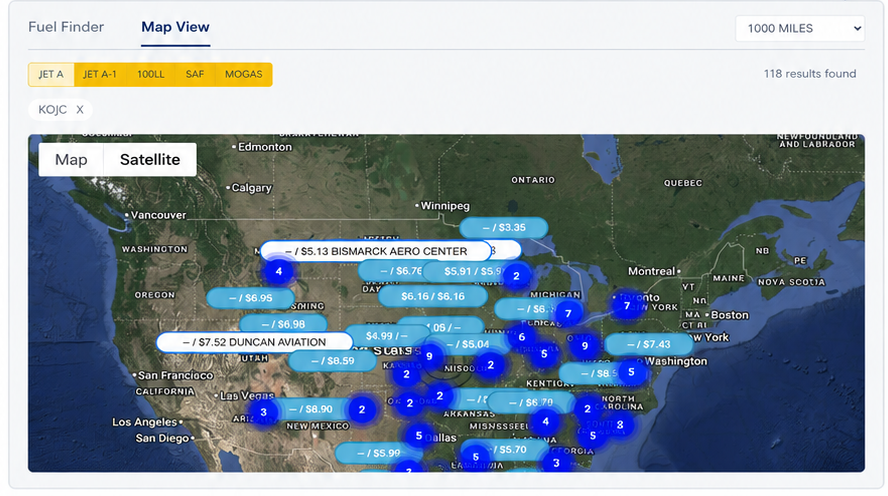
New table and interactive map views help aviation professionals compare retail fuel prices based on location, fuel type and brand
ACUKWIK.com has launched Fuel Finder, a new feature designed to help aviation professionals compare retail fuel prices and identify competitive fueling options during preflight planning.
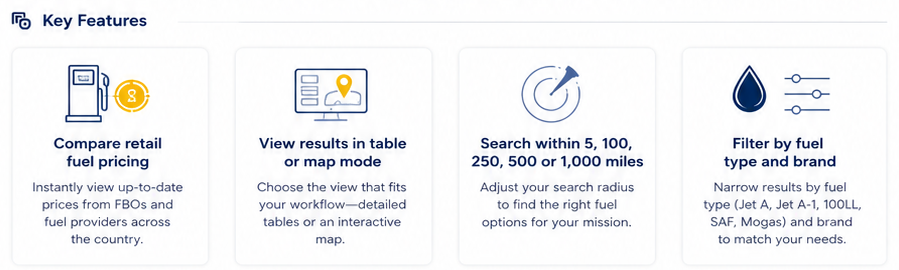
Fuel Finder provides users with two flexible ways to research fuel pricing: a streamlined table view and an interactive map. The feature is accessible from individual airport pages, allowing users to explore fuel options within 5, 100, 250, 500 or 1,000 miles of a selected airport and compare providers based on price and proximity.
Users can also access Fuel Finder through the ACUKWIK.com Advanced Search page to research fuel pricing and providers across broader geographic areas.
Advanced filters allow users to refine results by:
Fuel type: JET A, JET A-1, 100LL, SAF and MOGAS
Fuel brand: Select from available fuel brands to narrow search results
The launch builds on ACUKWIK’s recently introduced Fuel and Fees Dashboard, which gives FBO and ground handler managers a modern, self-service platform for updating fuel prices, fees and company listing information.
As more providers use the free dashboard to contribute current fuel pricing, Fuel Finder gives ACUKWIK.com users new ways to search, compare and incorporate that information into their trip-planning decisions.
“ACUKWIK.com has long been a trusted source of global FBO and ground handling information for aviation professionals,” says Dylan Goodwin, ACUKWIK, Director, Business Insights. “Modernizing how fuel pricing is collected and presented has been our priority from a development standpoint. The launch of Fuel Finder represents the next step in that effort, giving users a more intuitive way to compare fuel options as they plan their trips.”
Fuel Finder is now live and available to all ACUKWIK.com users. To explore the new feature, visit www.acukwik.com.
FBO and ground handler managers can learn how to update their fuel prices, fees and listing information through the ACUKWIK Fuel and Fees Dashboard at acukwik.com/Fuel-and-Fees-Dashboard-User-Guide.